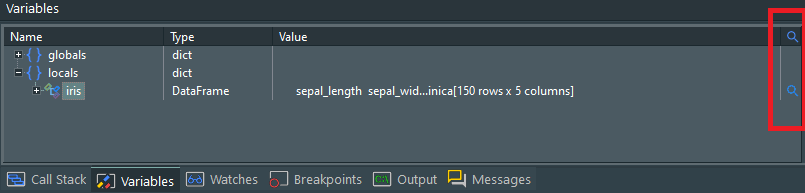
Variable inspectors, also known as debug visualizers, allow you to visually inspect variables of certain data types. Let’s start with an example.
The Variables window got a new column highlighted in red above. A magnifying glass is shown for variables that can be inspected. Clicking this magnifying glass, opens a window that provides a visual view of that variable, in this case a pandas dataframe:
In this window you can view the data in tabular form, show summary statistics and create a wide range of graphs.
This feature is also available for variables you create in the interpreter window. Initially, inspectors are provided for numpy 1 and 2-dimensional arrays, numpy matrices and pandas dataframes. These inspectors are based on the pandastable package, which you need to install using pip for the inspector to work. However, since variable inspectors are based on python code, you can create your own visualisers or modify existing ones
Under the hood
The installer creates a new subdirectory “Variable Inspectors” under %ALLUSERSPROFILE%\PyScripter (typically C:\ProgramData\PyScripter) and installs the factory provided inspectors in this folder. PyScripter creates another “Variable Inspectors” folder under %APPDATA%\PyScripter (typically C:\Users\UserName\AppData\Roaming\PyScripter). In the latter you can create your own inspectors. Registry free installations get instead just one “Variable Inspectors” folder under the root folder containing PyScripter.exe.
Each inspector is located in a subfolder of the “Variable Inspectors” folder. The name of the subfolder is not important, but its contents are. At a minimum this subfolder should contain two files:
- handled_classes.text
- main.py
The first one contains a list of python classes that can be handled by the inspector in the form module_name.class_name. The python file “main.py” contains code that:
- Checks that its dependencies are installed. If not, it provides an informative message box.
- Loads a pickled value from a file name that is provided as the first command line parameter.
- Checks that the provided value is of a supported type and then provides a visual inspection of that value.
It is recommended that a third file “requirements.txt” is also included, listing the package dependencies of the inspector. The user has to make sure that these dependencies are installed via pip (could be automated in the future).